


My Pantry Tracker
3.227.00 Reviews
App Specs
- Version
- 1.8.2
- Updated On
- License
- Free
- Downloads
- 10,000+
- Developer
- AppKing Software, Inc.
- Categories
- Food & Drink
- Platform
- Android
Screenshots
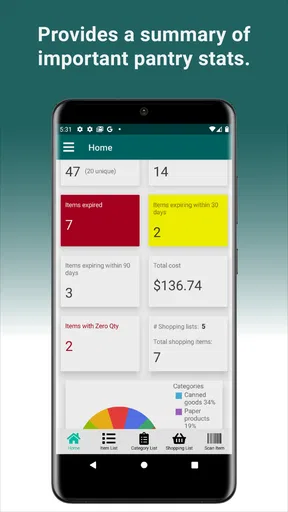
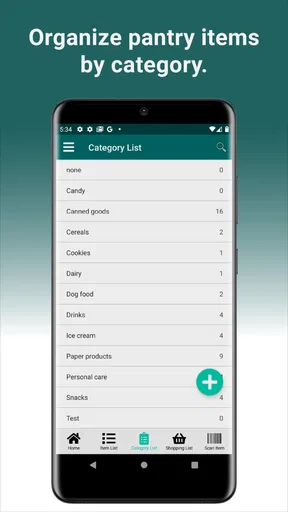
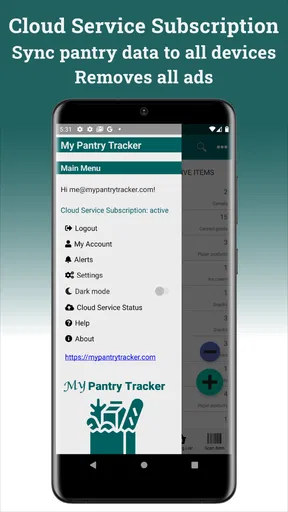
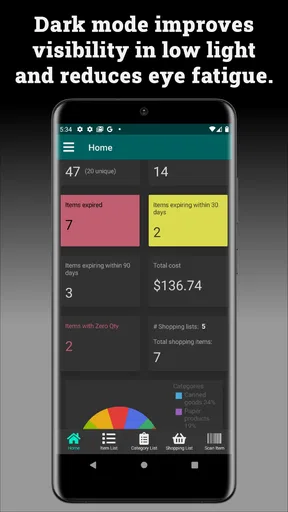
 Analysis by AppCompare
I find pantry apps most useful when they fit the way I already shop, rather than asking me to turn every grocery trip into a data-entry project. My Pantry Tracker is aimed at that everyday problem: keeping a clearer picture of what is at home by adding food items, including through barcode scanning. It is a free Food & Drink app from AppKing Software, Inc., with optional in-app purchases priced from $0.99 to $9.99 per item. Its Everyone age rating makes it suitable for a broad audience, though the practical question is whether its inventory approach matches your household habits.
A sensible routine starts with the things you forget
I would not begin by cataloguing every spice, packet, and half-used jar in the kitchen. That sounds thorough, but it is also the quickest way to abandon an inventory app. I would start with the items that cause repeat shopping mistakes: unopened tins, breakfast staples, rice, pasta, cooking oil, and anything bought in bulk. Those are the things most likely to be forgotten behind newer groceries, and they are straightforward to identify when scanning or entering them.
Once that core list is in place, the inventory becomes more useful as a shopping check than as a perfect record. Before heading to the store, I can look for the ingredients I tend to assume I have, then confirm whether they are actually in the cupboard. A barcode scan can make adding packaged goods less tedious, but it is still worth checking the item details and amount rather than treating every scan as a finished entry. For loose produce, leftovers, or food moved into a container, a manual entry is the more realistic option.
Settings and habits that keep the list useful
The quality of any pantry tracker depends on small habits more than on a one-time setup. I would check the app’s available preferences early and keep the workflow simple: record an item when unpacking groceries, adjust its amount when using a meaningful portion, and remove it once it is gone. I would not try to measure every spoonful. For products that are used gradually, a rough quantity is often enough to answer the useful question: do I need to buy more this week?
Expiration tracking is most valuable when dates are entered carefully and checked against the package. I would prioritize foods that are easy to overlook or that have a shorter shelf life, rather than filling in dates for every long-lasting dry good. A practical routine is to add dates while putting groceries away, then scan the pantry before planning meals. That makes the reminder information actionable instead of another set of details that becomes stale.
One trade-off to keep in mind is that scanning saves typing only when the barcode is recognized and the resulting entry makes sense. If a product is unfamiliar to the scanner, a short manual entry is usually less frustrating than repeatedly trying the same angle. Keeping names consistent also helps later: if I call the same staple by a different name each time, the inventory becomes harder to scan at a glance. The goal is a list I can trust, not an exhaustive catalogue.
Where this approach helps most
This kind of tool makes particular sense for people who cook at home regularly, shop for a household, or keep backup food in a pantry or cupboard. It can also help someone trying to use what they already own before buying more. If I have beans, tomatoes, and rice in stock, seeing them together may prompt a meal I would otherwise overlook. That is a modest but useful benefit: the app does not need to replace a recipe book to help me make a better decision.
Worth Reading Before You Choose

Flipboard Shows What News Apps Must Do Beyond the Feed

Switching to Android Auto Means Rethinking Your Driving Routine

Google Calendar Makes a Crowded Week Easier to Manage

Ludo King Makes the Most of the Minutes Between Plans

Baby Panda World Brings Quick Play to Modern Phones, but Its Game Library Feels Busy

ESPN’s Live Game View Makes Following Close Games Easier
It is less compelling if you buy food day by day, rarely store packaged items, or expect automatic recognition to handle every product without a check. A paper list on the refrigerator may be faster for a very small household with only a few regular groceries. A general notes app may be preferable if all you need is a shared reminder such as “milk” or “coffee.” Pantry-specific tracking is worthwhile when the extra structure answers recurring questions about stock and quantities; otherwise, it can become maintenance for its own sake.
What to expect from the app itself
My Pantry Tracker has an average rating of 3.2 from around 43 ratings, with 24 written reviews and over 10,000 installs. I take that as a reason to approach it with measured expectations rather than assume every part will feel polished for every user. It is free to download, while in-app purchases are available; I would check what an optional purchase covers before paying, and first see whether the basic inventory routine already solves my problem.
The app’s current version is 1.7.1, and it runs on Android 5.0 or later. That broad compatibility can be useful if you keep an older phone for household tasks. Before relying on any pantry app across a family’s devices, I would test the actual handoff that matters: add or update a common item on one device, then check whether the other person can see the change. A shared list is only dependable if everyone follows the same update habit, so agreeing who records groceries and when is just as important as installing the app.
For comparison, a notes app or shared checklist is usually quicker to maintain but does not encourage a structured inventory. A spreadsheet can be customized more deeply, though it asks for more setup and upkeep. My Pantry Tracker sits between those options: it offers a pantry-focused way to record items, while barcode entry can reduce the effort for packaged food. I would choose it over a plain checklist if I regularly need to check quantities or organize a broader cupboard; I would choose a simpler alternative if I only want to remember a handful of shopping items.
There are also limits to what a digital list can tell me. An entry is not proof that food is still usable, and a date reminder cannot replace checking the packaging or using common sense. Likewise, inventory is only as current as the last update. When several people take food from the same shelf without recording it, the list can quickly become optimistic. That is not a flaw unique to this app, but it is a real reason to keep the tracked inventory focused on goods whose status is easy to maintain.
A realistic routine might look like this: after a weekly grocery trip, I scan the packaged staples I bought, enter a few unrecognized items manually, and set aside the more perishable groceries for date tracking. Before deciding what to cook later in the week, I check the inventory and use up something already open. At the next shop, I verify the items I am unsure about instead of trusting a quantity that has not been updated. This light-touch pattern gives the tracker a job without turning kitchen management into a chore.
Getting Started with My Pantry Tracker
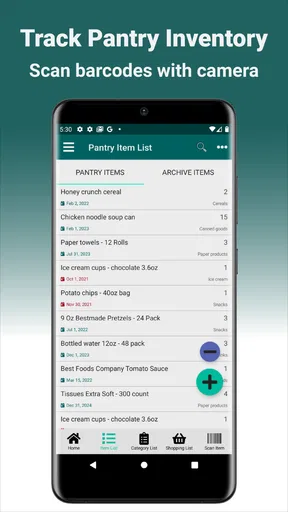
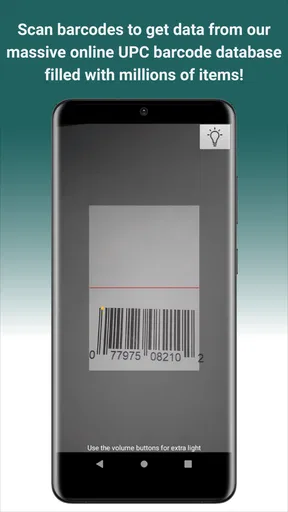
When you first download My Pantry Tracker, setting it up is a breeze. The app walks you through the initial setup with a friendly interface that even my tech-shy grandma could navigate. You start by adding items to your virtual pantry. This can be done manually by typing in the items or by scanning barcodes, which is pretty cool if you’re like me and hate typing on tiny screens.
The app supports a wide range of food items, so whether you’re storing quinoa or canned beans, it’s got you covered. And if you’re wondering about quantities, don’t sweat it. My Pantry Tracker lets you specify amounts, so you’ll know exactly how much pasta you have left for that impromptu Italian dinner night.
The Features That Stand Out
One of the standout features is the meal planning tool. This is a lifesaver for those of us who are perpetually busy. You can plan meals for the week, and the app will suggest recipes based on what you have. It’s like having a personal chef whispering ideas in your ear.
Another feature worth mentioning is the expiration date tracking. No more tossing out expired goods you forgot about. The app alerts you when items are nearing their expiration date, which not only saves money but also minimizes waste. Win-win!
Plus, if you’re a fan of organization (who isn’t?), the app categorizes items so you can easily find what you’re looking for. It’s like having a perfectly organized pantry without lifting a finger.
Shopping Made Simple
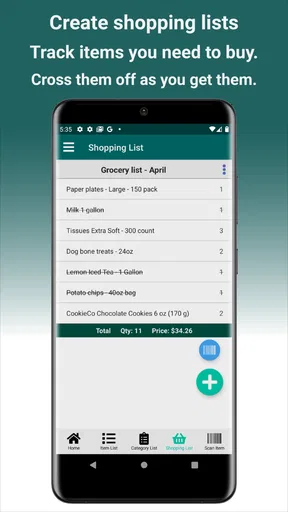
My Pantry Tracker isn’t just about keeping tabs on what you have; it’s also a powerful tool for creating shopping lists. Based on your inventory, you can generate lists for what you need to restock. You can even sync the list with your partner’s phone, so you both know who’s picking up the milk.
If you’re into using multiple devices, you’re in luck. The app syncs across devices so you can update your pantry from your tablet, phone, or even your laptop. It’s all about making life easier, right?
The User Experience
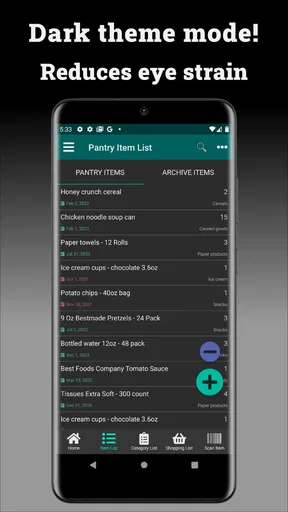
Now, let’s chat about the user experience. The design is clean and intuitive, with a color scheme that’s easy on the eyes. Navigation is straightforward, so you won’t find yourself lost in a maze of menus. The app is responsive and quick, with no noticeable lag, which is a big plus.
However, no app is perfect. I noticed that the barcode scanner occasionally had trouble recognizing some items. It’s not a deal-breaker, but it’s something to keep in mind if you rely heavily on that feature. A quick manual entry usually solves the issue, though.
The scanner issue is why I would treat barcode entry as a shortcut rather than the whole system. If an item does not scan cleanly, I would enter it once in a recognizable way and move on. For goods I buy repeatedly, I would keep the same naming and quantity style each time; for one-off ingredients, a quick basic record is enough. This keeps the most useful parts of the pantry visible without creating duplicate or confusing entries.
Using the features as a repeatable system
Meal planning works best when I use it as a prompt, not as an instruction to follow blindly. I would first check what needs using, then plan a couple of meals around those ingredients and fill in the rest with familiar recipes. That order matters: planning from the inventory can reduce waste, while planning first and checking the pantry afterward often just reveals missing ingredients. I would also keep expectations grounded: a suggestion based on what is recorded can only be as relevant as the entries I have maintained.
For shopping lists, the useful habit is to separate “we are out” from “we might need this soon.” Before leaving home, I would review the list against the pantry and correct anything that changed since the last update. If two people shop, a quick agreement about who marks purchases or pantry changes prevents duplicate buying. The app can help coordinate a list, but the household still needs a simple routine for keeping it current.
Expiration reminders are another place where a little selectivity pays off. I would focus on foods that are easy to lose track of, then make a quick check part of meal planning. Dates printed on packages can refer to different kinds of quality or safety guidance, so I would not treat an alert as a substitute for reading the label. In practice, the feature is a nudge to inspect and use something in time, not a guarantee that the food is either good or bad.
Who will get the most from it
I would recommend this approach to someone who repeatedly buys duplicates, forgets what is in a cupboard, or wants a practical way to rotate pantry staples. It is especially sensible for a household where one person does the shopping and another does the cooking, provided both are willing to make occasional updates. A student or solo cook with a small number of reliable ingredients may also find a lightweight inventory helpful, particularly when money is tight and using existing food matters.
On the other hand, I would skip it if maintaining records feels more annoying than checking the shelves, or if most of your food is fresh and changes too quickly to track comfortably. It is also not the right answer for someone expecting a hands-off kitchen assistant that knows every item automatically. In those cases, a shared note, a short paper list, or simply a weekly cupboard check can be more reliable because it asks less of everyone.
A balanced recommendation
All in all, My Pantry Tracker is a handy app for anyone looking to streamline their kitchen management. Whether you’re an avid cook or just want to keep track of your groceries better, it’s a tool that can make your life a bit simpler. While there are a few hiccups here and there, the pros definitely outweigh the cons.
So, if you’re tired of the guessing game every time you open your pantry, give My Pantry Tracker a try. It might just become your new best friend in the kitchen.
Pros
- User-friendly interface for quick navigation.
- Barcode scanning for easy item logging.
- Customizable alerts for expiry dates.
- Detailed nutritional information available.
- Offline functionality for no internet use.
Cons
- Limited cloud sync options available.
- No integration with smart home devices.
- Occasional glitches in barcode scanning.
- Premium features locked behind paywall.
- Lacks multi-user collaboration features.
FAQs for My Pantry Tracker
What features does My Pantry Tracker offer to help manage my kitchen inventory?
My Pantry Tracker provides a comprehensive set of features to manage your kitchen inventory efficiently. It allows you to add and categorize items, set expiration dates, and receive notifications before items expire. The app also offers a barcode scanner to quickly input items and supports cloud synchronization to access your inventory across multiple devices.
Is My Pantry Tracker available on both Android and iOS platforms?
Yes, My Pantry Tracker is available for download on both Android and iOS devices. You can find it on the Google Play Store for Android users and the Apple App Store for iOS users. This cross-platform availability ensures that you can manage your pantry regardless of the device you prefer to use.
Can I share my pantry inventory with family members or roommates using My Pantry Tracker?
Absolutely! My Pantry Tracker allows you to share your pantry inventory with family members or roommates. This feature ensures everyone is on the same page regarding available items and grocery needs. You can invite others to view and update the inventory, making it easier to collaborate on shopping lists and meal planning.
Does My Pantry Tracker require an internet connection to function?
My Pantry Tracker offers both online and offline functionality. You can manage your inventory without an internet connection, and any changes made will sync automatically once you're back online. This feature is particularly useful if you're in areas with limited connectivity or prefer managing your pantry without using data.
How does My Pantry Tracker handle data privacy and security?
My Pantry Tracker prioritizes user privacy and data security. The app uses encryption to protect your information and offers options to back up data securely. Additionally, it complies with standard data protection regulations to ensure your personal information is safe. You can review their privacy policy for detailed information on data handling practices.


